Keyboard Mapping and Control Scheme
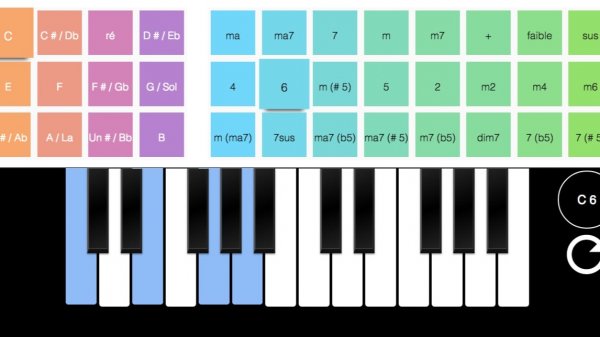
Virtual Piano Music Simulator assigns each piano key to a specific computer keyboard button. The white keys correspond to caps lock, A, S, D, F, G, H, J, K, L, semicolon, apostrophe, and the left arrow key. Black keys are triggered by Q, W, R, T, Y, I, O, opening bracket, closing bracket, and enter. Pressing any of these keys produces the matching piano note. On mobile devices, the on-screen keyboard replaces physical keys, so the same layout works through touch. Fullscreen mode removes browser clutter and gives the keyboard more room, which helps when you are reading note patterns or following along with a song.
Chords Assist and Harmonic Playing
The chords assist feature lets you play harmonies without pressing every note in a chord manually. This lowers the coordination barrier for beginners who want to accompany a melody or experiment with fuller sounds. Instead of struggling to hit three or four keys at once, you can trigger a chord and focus on timing and rhythm. More experienced players can still play individual notes when they want precise control. The assist works alongside the standard key layout, so you can switch between single-note runs and chordal passages without changing any settings.
Skill Levels and Practice Approach
The simulator suits two broad groups. Beginners can start with simple melodies using only the white keys, then add black keys as they grow comfortable with the layout. The chords assist provides a gradual path toward understanding harmony. Experienced players get a no-setup practice surface for reviewing songs, testing chord progressions, or warming up. Because the tool runs in a browser, there is no installation step and no account requirement mentioned. The interface stays minimal, which keeps attention on the keys rather than menus. Regular short sessions tend to be more useful than long, irregular ones, especially for building the muscle memory that maps letters to pitches.
Session Design and Focus
Every session is self-directed. There are no levels, scores, or unlockable content described in the source. The value comes from what you choose to play. A calm visual environment and the absence of ads or distracting elements support that. You can play for two minutes or twenty. The fullscreen option is the main tool for reducing visual noise. Mobile support means the same practice space travels with you. The realistic piano sounds aim to make the experience feel closer to a physical instrument, though the input method remains a keyboard or touchscreen rather than weighted keys.




Comments
0 comments