Space Table Layout and Core Play
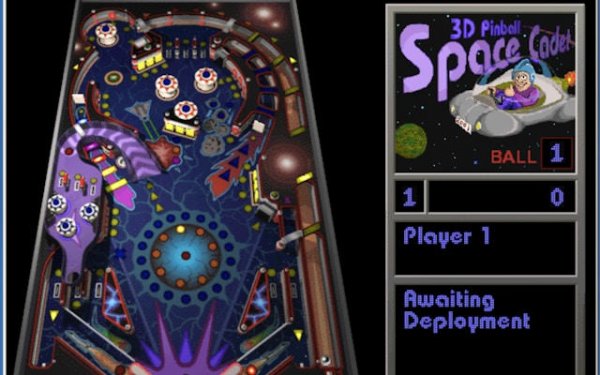
Galaxy Pinball Arcade places a single space-themed table at the center of the experience. The playfield is populated with bumpers, ramps, and dynamic elements that react to ball contact. Your job is straightforward: launch the ball with the plunger, then use the flippers to keep it from draining while directing it toward targets. Nudging the table can subtly alter the ball's path, though tilting remains a risk. The physics aim for realistic ball movement, so momentum and angle matter as much as quick reflexes. [IMG_1]
Mission Prompts and Rank Progression
Beyond simply racking up points, the game layers a mission-based progression system on top of the pinball action. On-screen prompts appear during play, and completing them moves you through ranks that begin at Cadet and extend to Fleet Captain. This gives each session a defined goal rather than a pure score chase. The prompts also encourage you to aim for specific ramps or bumpers instead of reacting randomly, which changes how you approach the table over time.
Controls, Accessibility, and Presentation
Controls are kept simple for easy pick-up-and-play: a plunger launch, flipper buttons, and a nudge input. That low barrier suits the family-friendly design, and the nostalgic presentation and sound effects reinforce the classic arcade pinball feel. Because the table is fixed rather than a rotating set of layouts, learning its geometry becomes part of the long-term appeal. [IMG_2]
Practical Play Advice
Timing flipper presses carefully keeps the ball under control and reduces accidental drains. Prioritize hitting targets and ramps that correspond to active mission prompts, since those advance your rank. Gentle nudges can correct a bad bounce, but excessive use risks tilting. Repeated sessions naturally build familiarity with the table's angles and the rhythm of its bumpers.







Comments
0 comments