A Blank Canvas for Young Designers
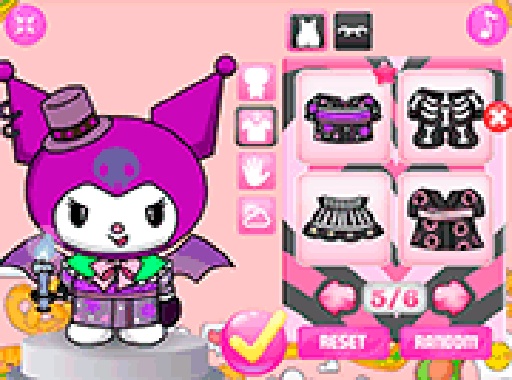
Character Style Studio opens with an empty character template. From there, players pick hairstyles, clothing pieces, accessories, and colors from a full spectrum. The interface uses large buttons and clear labels, and every choice updates the character instantly. Because icons guide the selection process, preschoolers can play without reading. Older children who want a quick creative break can also move through categories at their own pace. There is no timer, no score, and no failure state.
The Random Design Generator
When a player feels stuck or simply wants a surprise, one click produces a complete character look. This feature works as a creative prompt: it introduces combinations that a child might not have tried otherwise. Each random result is different, so the generator adds replay value and encourages repeated attempts. It also helps younger players who may not yet have a clear idea of what they want to build. [IMG_1]
Reset, Revise, and Refine
A reset function clears the current design at any time. That means a child can test bold color pairings or unusual accessory combinations without penalty. If the result does not feel right, one tap returns them to a fresh start. This iterative loop is where the game quietly teaches decision-making and personal taste. Players learn to compare options, commit to a direction, and change their minds when needed — all in a low-stakes environment.
Saving and Sharing Finished Looks
Once a design is complete, it can be saved as a PNG image directly to the device. Saved files let children build a personal gallery of favorite characters, share them with family, or use them as profile pictures. The ability to keep finished work also provides a sense of accomplishment. Looking back at older designs shows how a child's style preferences have evolved over time. [IMG_2]






Comments
0 comments